A branded client portal and automatic reports for your agency.
Give every client their own portal with progress, files, approvals and reports — so you stop answering “where are we on this?” emails. Connect the board you already work on in Trello, Asana or Notion and the progress is read from it.
Card required. Nothing is charged until the trial ends.
Client updates eat your week.
Clients email for status because they can’t see the board you work on.
Files and approvals get lost across email threads and chat.
Monthly reports are assembled by hand, then sent as attachments.
How it works
Three steps, once per project.
- 1
Connect the board you already use
Works with Trello, Asana and Notion. Map your lists, sections or status options onto the To do, In progress and Done stages, and several of them can feed the same stage. Available on the Pro and Agency plans.
- 2
Share the client portal
Every project gets its own branded link. Your client opens it — no account to create, no password to remember — and reads it in the language and the light or dark theme they pick. You can lock the link with a PIN on the Pro and Agency plans.
- 3
Send reports in one click
Generate a PDF report whenever you want, or put it on a weekly or monthly schedule on the Pro and Agency plans. On a project connected to a board, the form opens with the progress and the work already drafted from it, and you edit that draft before it reaches your client.
What’s in the portal
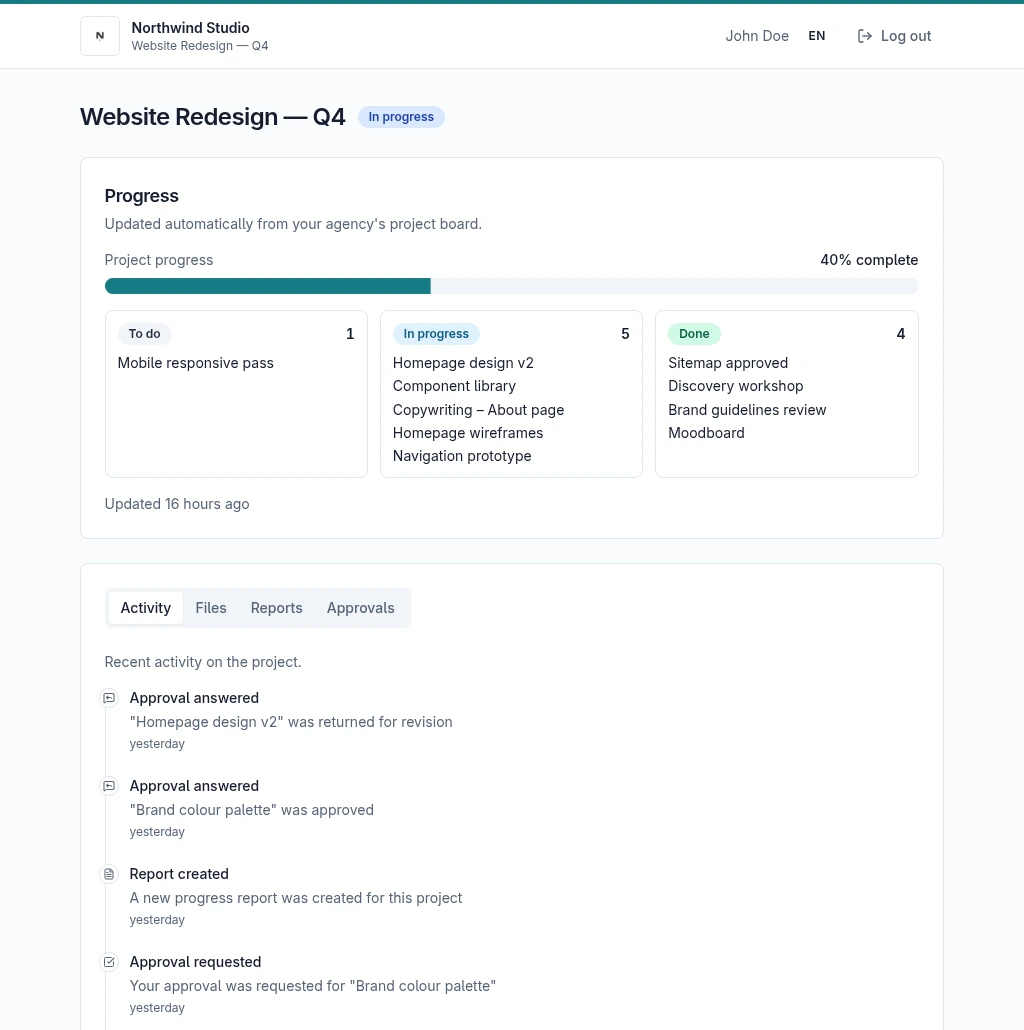
Each client sees only their own project.
Files, approvals and reports in one place
Upload deliverables, ask for sign-off and publish reports from the project page. Your client finds all three in their portal.
Approvals, answered in the portal
Ask for sign-off from the project page. Your client approves it or asks for a revision right there, and can leave a note saying what they want changed. The answer lands back on your project.
PDF reports
Write the report once and the project fills in the rest. Download it, or let the portal hand it to your client.
- Pro and Agency
Progress from your own board
Connect Trello, Asana or Notion and the number of tasks in each stage becomes a progress bar your client can read; reports on a connected project use the same figure. Task titles stay hidden until you turn them on for a project. Your tasks stay in the tool you already use.
See the real client portal
This opens the portal a client actually gets, filled with a sample project. No sign-up and nothing to install — and nothing you press changes anything, because the demo is read-only.
Open the live demoRead-only demo with sample data.
Your side of the portal
The dashboard and project page you work from — in your language, in light or dark, and in the colour palette you pick.
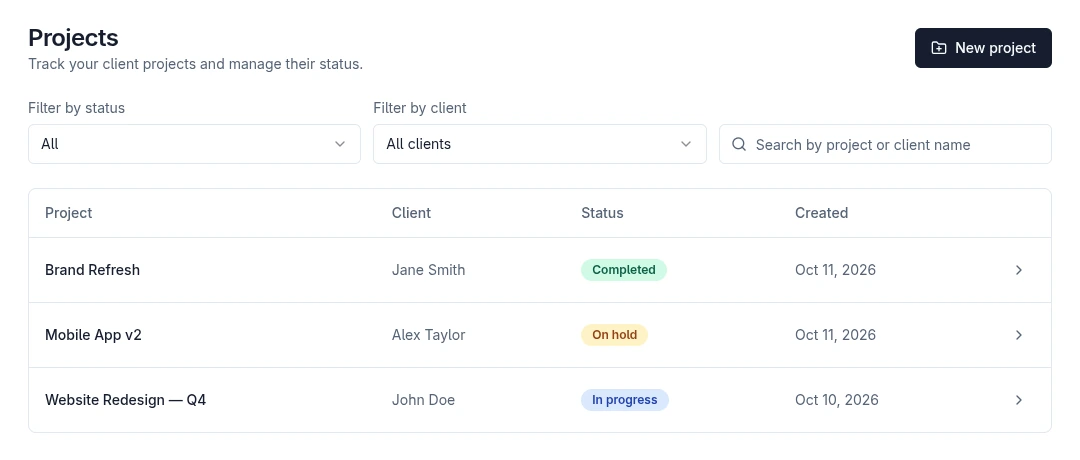
Every client project in one list
Each project with its client, its status — in progress, on hold or completed — the date it was created and whether its portal link has been opened. Filter by status or by client, or search by name once the list gets long.
One page to run a project from
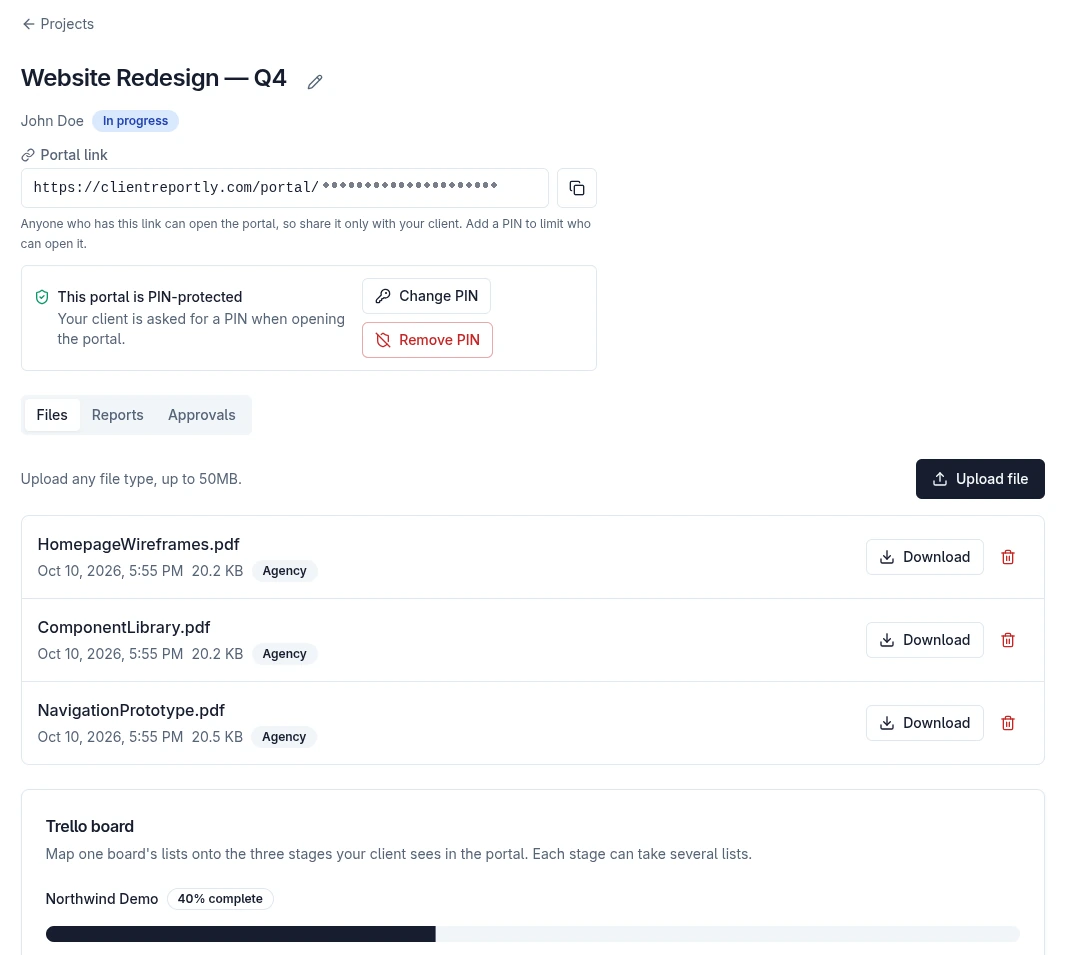
The portal link to send your client, with a PIN on it if you want one, and how many times that link has been opened — a count and a date, with no address, browser or device recorded. Files, reports and approvals in their own tabs, and the board whose lists feed the three stages your client sees.
Your client gets an email when you publish a report, upload a file or ask for sign-off. On the Agency plan the email carries your agency’s name and colors in the header. Mail is delivered by our servers, not from your own domain.
Built by a solo founder who got tired of status-update emails.
ClientReportly is young, and it’s being shaped together with its first agencies. If something is broken, confusing or missing, write to support@clientreportly.com. Replies come from the person who builds it.
Email me directlyA card is required to start the 14-day trial, and nothing is charged until the trial ends.
Payment and invoicing run through Paddle on their own pages, so your card details never reach our servers.
The Privacy Policy and the Data Processing Agreement are written and published — read them before you sign up, not after.
You can cancel from the billing screen in your account at any time, and it takes effect at the end of the current period.
Plans
Connecting a board — Trello, Asana or Notion — and portal PINs are on Pro and Agency; branded PDF reports, the custom domain and white-label are on Agency. See the price for your country on the pricing page.
Basic
- Clients
- 3
- Projects
- 3
- Team members
- 1
- Storage
- 500 MB
- Single file size
- 10 MB
- OnRevision limit feature · On in all plans
- OffAutomated reports (weekly/monthly) · Manual only
- OffPortal PIN protection
- OffProject board connection (Trello, Asana or Notion)
- OffBranded email notifications · Generic template
- OffBranded PDF reports (your logo and color)
- OffWhite label · "Powered by" signature stays
Pro
- Clients
- 15
- Projects
- Unlimited
- Team members
- 5
- Storage
- 5 GB
- Single file size
- 25 MB
- OnRevision limit feature
- OnAutomated reports (weekly/monthly)
- OnPortal PIN protection
- OnProject board connection (Trello, Asana or Notion)
- OffBranded email notifications
- OffBranded PDF reports (your logo and color)
- OffWhite label · "Powered by" signature stays
Agency
- Clients
- Unlimited
- Projects
- Unlimited
- Team members
- Unlimited
- Storage
- 50 GB
- Single file size
- 50 MB
- OnRevision limit feature
- OnAutomated reports (weekly/monthly)
- OnPortal PIN protection
- OnProject board connection (Trello, Asana or Notion)
- OnBranded email notifications · In agency color
- OnBranded PDF reports (your logo and color)
- OnWhite label · "Powered by" signature removed
Questions
No. They open a link. You can protect it with a PIN on the Pro and Agency plans.
Yes, on Pro and Agency. ClientReportly connects with Trello, Asana and Notion: you choose which lists, sections or status options count as To do, In progress and Done, and several of them can feed the same stage. We ask for read access only — your tasks stay in the tool and nothing there is changed.
Only what you add to their project: progress, files, approvals and reports. They get no access to your board — they see how many tasks are in each stage, and the task titles only if you turn them on for that project.
Your logo and brand colours are on every plan, and the portal keeps them whether your client reads it in light or dark. A custom domain and hiding the “Powered by” line are on the Agency plan.
The interface is in six languages — English, Turkish, German, Spanish, French and Portuguese — and your client switches the portal to theirs from its own header. The language of the emails and PDF reports sent to your clients is a separate setting in your agency profile, so changing the language you work in doesn’t change theirs.
14 days. A card is required to start, nothing is charged until the trial ends, and you can cancel any time before that.
What we collect, how long we keep it and the measures we apply are written out in our Privacy Policy. The terms covering your own clients’ data are in the Data Processing Agreement.
Open your first client portal today
Sign up, connect your board and send your client a link.
Card required. Nothing is charged until the trial ends.